
Moodle Migration Services
Moving Moodle to AWS Sydney or Melbourne, or off another platform - rehearsed on staging, restores verified, cutover scheduled around your assessment calendar.

Migrations go wrong in predictable ways: a file area that did not come across, a cron job nobody restarted, a plugin that does not exist on the new PHP version, or a cutover scheduled on top of an assessment week. All of those are avoidable, and avoiding them is mostly a matter of rehearsing rather than hoping.
What we migrate
- Moodle to Moodle – from shared hosting, a VPS, an on-premise server, or another managed provider, onto AWS Sydney or Melbourne.
- Version upgrades bundled with the move, where you are far enough behind that upgrading in place is riskier than rebuilding.
- Other platforms to Moodle – we have built tooling to bring courses, users, grades and completion state across from Canvas LMS. Every platform migration is bespoke, and we will tell you honestly what will and will not survive the trip.
How we run one
- Audit. Current version, PHP version, database engine and size, moodledata size, every installed plugin and whether it is maintained, and what your cron is actually doing. This is where the surprises live, so we do it first.
- Build the target. New environment provisioned and tuned in your chosen AWS region, with the Moodle version and PHP version agreed in advance.
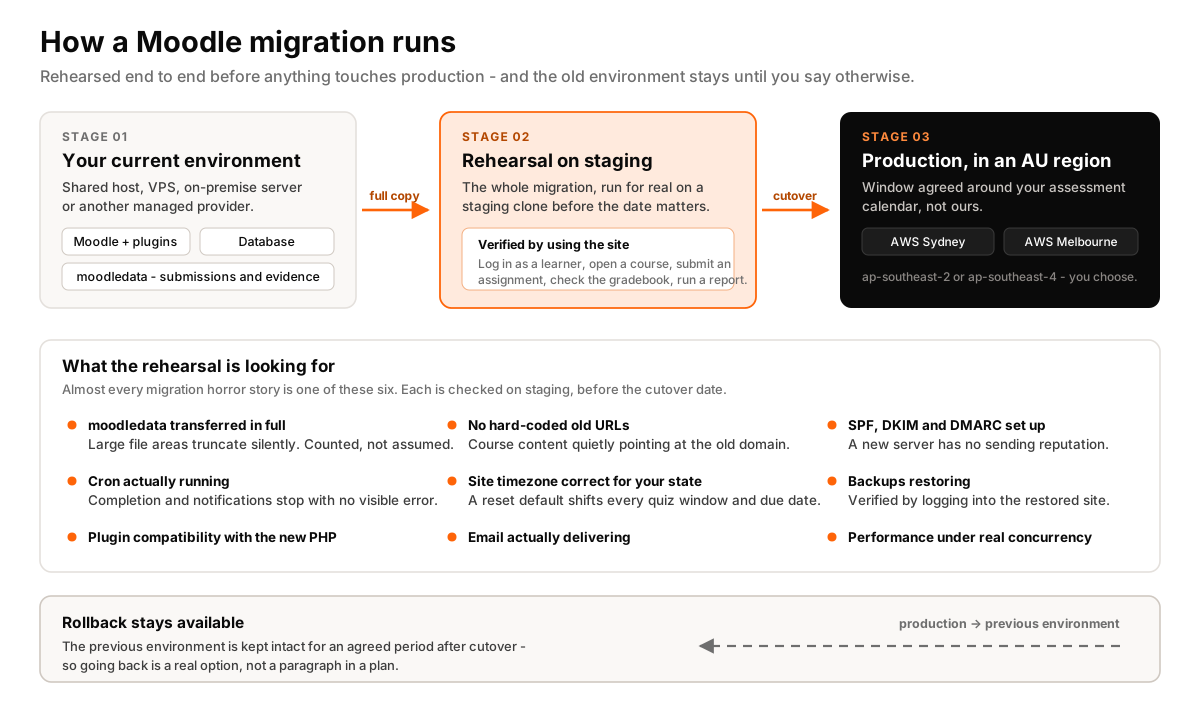
- Rehearse. A full migration onto staging, then verification by actually using the site – log in as a learner, open a course, submit an assignment, check the gradebook, run a report. Not a checklist of services being up.
- Fix what the rehearsal found. There is always something. Better now than during the cutover.
- Cut over. A final sync in an agreed window, scheduled around your assessment calendar. Brief read-only period, DNS switched, old environment kept intact.
- Hold the old site. We keep the previous environment available for an agreed period. Rollback is a real option, not a paragraph in a plan.
The things that actually break
From experience, in rough order of frequency: moodledata not fully transferred (large file areas silently truncated); cron not running on the new host, so completion and notifications stop without an error anyone sees; a third-party plugin incompatible with the newer PHP version; hard-coded URLs in course content pointing at the old domain; the site timezone reset to a default that is wrong for your state; and email deliverability, because the new server has no sending reputation and nobody set up SPF, DKIM and DMARC before go-live.
We check every one of these as part of the rehearsal. Most migration horror stories are one of these six.
When we tell you not to migrate
If your site is slow because of one badly written plugin or a missing database index, new hosting will not fix it – you will pay for a migration and still have a slow site. We will find that during the audit and tell you, even though it is a smaller job for us. Our notes on diagnosing Moodle page load problems cover how to check before you commit.
Where this stops
- We do not sell or operate a student management system. We integrate Moodle with the one you already run.
- We do not prepare or lodge compliance reporting. We make sure Moodle holds clean, exportable data for the people who do.
- We are not a Moodle Partner. We are independent – weigh that as a trade-off rather than assuming either way.
- We do not write your course content. We build and run the platform it lives on.
Related services
Migration usually leads into managed hosting and ongoing maintenance. If the move is also a chance to fix integrations, see integration. For costing, start with what drives Moodle hosting cost.