
Moodle Page Load Issues: Causes & Fixes
·
Moodle Page Load Issues: Causes and Fixes
Moodle page load issues can significantly impact learner experience, especially when users face slow course loading, delayed quizzes, or unresponsive dashboards. This article explains why Moodle performance problems happen and how to fix them effectively.
Poor performance is often caused by hosting limitations, database bottlenecks, or missing caching layers.
Useful references:
Moodle Official Site (https://moodle.org) | Redis Caching (https://redis.io) | Google PageSpeed Insights (https://pagespeed.web.dev/)
A slow Moodle site can also increase support tickets and reduce confidence in your training programs. This article explains the main causes of Moodle page load issues and how to fix them effectively.
Why Moodle Page Load Issues Matter
caption id=”attachment_531″ align=”alignnone” width=”1000″ impacting learner[/caption]
Slow performance is not just a technical problem – it directly impacts learning outcomes.
- Lower learner engagement
- Reduced course completion rates
- Higher dropout rates
- Poor user satisfaction
- Increased IT support requests
If Moodle pages are slow, learners simply disengage.
Common Causes of Moodle Page Load Issues
caption id=”attachment_532″ align=”alignnone” width=”1398″ Moodle hosting and server performance issues causing slow loading[/caption]
1. Poor Moodle Hosting Performance
Many Moodle performance problems start with weak hosting infrastructure.
- High CPU usage
- Low RAM availability
- Slow disk I/O
- Shared hosting limitations
2. Database Bottlenecks in Moodle
caption id=”attachment_533″ align=”alignnone” width=”1268″ Moodle database performance issues and slow SQL queries[/caption]
The Moodle database handles everything – users, courses, grades, and logs.
- Missing indexes
- Large log tables
- Slow SQL queries
- Poor optimisation
3. Missing or Incorrect Caching
Without caching, Moodle repeatedly rebuilds pages and increases server load.
- Redis caching improves performance
- OPcache speeds up PHP execution
- Browser caching reduces load time
Moodle Page Load Issues from Plugins
Poorly built plugins can significantly slow Moodle down.
- Excess database queries
- Heavy background tasks
- Inefficient rendering
How to Fix Moodle Page Load Issues
Improve Hosting Infrastructure
- Dedicated servers
- Cloud hosting
- Scalable architecture
Enable Caching (Very Important)
- Redis (sessions + cache)
- OPcache (PHP optimisation)
- Browser caching
Optimise Database
- Clean logs regularly
- Add missing indexes
- Optimise slow queries
Best Practices for Moodle Performance
- Monitor performance regularly
- Remove unused plugins
- Optimise course content
- Archive old courses
- Track server health
When to Get Moodle Performance Help
If issues persist, a professional Moodle performance audit can help identify hidden bottlenecks.
- Server tuning
- Database optimisation
- Caching configuration
- Plugin analysis
- Infrastructure review
Final Thoughts
Moodle page load issues can seriously affect learner experience and organisational training outcomes.
However, with proper hosting, caching, and database optimisation, most performance issues can be resolved effectively.
Need Help Fixing Moodle Performance?
If your Moodle site is slow or struggling under load, professional optimisation can significantly improve performance.
- Moodle hosting optimisation
- Performance audits
- Redis configuration
- Database tuning
- Scalable infrastructure setup
Ready to boost your Moodle hosting performance? Book a free consultation today to host your Moodle LMS with expert support, high uptime, and secure, scalable infrastructure.
📞 Contact Us
📧 support@techlearning.com.au
🌐 www.techlearning.com.au/contact
Diagnose before you buy anything
The single most expensive mistake with a slow Moodle is buying a bigger server before finding the cause. If the bottleneck is a plugin running an unindexed query on every page, more CPU buys you a marginally faster version of the same problem – and the invoice recurs monthly.
Establish first whether the site is slow always or slow sometimes. Always-slow points at configuration – caching off, a debug setting left on, theme CSS being regenerated per request. Sometimes-slow, particularly at predictable times, points at concurrency or a scheduled task colliding with teaching hours.
Work through it in this order
- Check the obvious settings. Debugging left enabled, caching disabled after a troubleshooting session, and theme designer mode left on are together responsible for a remarkable share of slow Moodle sites.
- Look at cron. If cron is not completing, tasks queue up and eventually run all at once. Check when it last finished, not just that it is scheduled.
- Turn on slow query logging. An hour of real traffic usually names the offender outright. Guessing which plugin is at fault wastes far more time than measuring.
- Disable third-party plugins one at a time on a staging copy. This is tedious and it is also decisive.
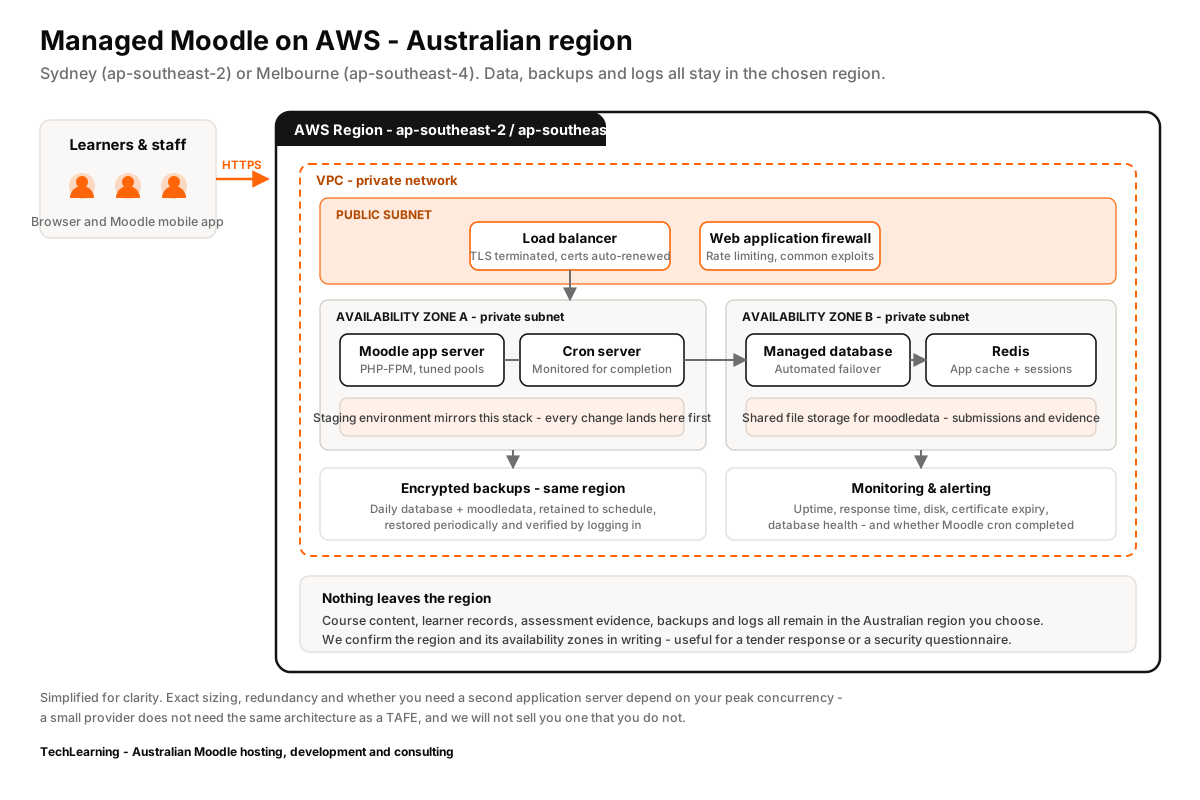
- Only then look at the server. PHP-FPM pool sizing, Redis for sessions and application cache, and database tuning matched to Moodle’s query pattern.
The peak that actually matters
Sizing against total enrolled learners is misleading. The number that determines whether your site holds up is how many people are in the same activity in the same fifteen minutes – typically a quiz opening. A site with 4,000 learners and staggered self-paced study needs less capacity than one with 400 learners who all sit an exam at 9am on Monday.
If you can name your worst simultaneous assessment, that is the figure to size against and load-test before it happens rather than during.
Slow for some learners only
If complaints cluster geographically, the problem may not be the server at all. Latency from Perth to an eastern-state region is real, and a page making many uncached round trips amplifies it. The fix there is caching strategy and reducing request count, not a larger instance.
If your Moodle is slow right now
Work through the causes above in order – they are listed by how often they turn out to be the culprit. Most slow Moodle sites are slow for one identifiable reason, and it is usually a single plugin, a missing database index, or cron not completing rather than the server being too small.
If you would rather someone else find it, that is what our support and maintenance work starts with, and it is the first thing we do on any migration. We will tell you if the answer is a configuration change you can make yourself – moving hosts will not fix a plugin problem, and we would rather say so before you pay for a migration than after.
Comparing providers? Take the 30 questions to ask any Moodle host into the call.