Moodle Hosting Performance Optimization Guide 2025
·

If your Moodle site feels slow or struggles with 1000+ active learners, you’re not alone. As courses, media, and plugins grow, server strain becomes a real challenge. In this guide, you’ll learn practical ways to boost Moodle hosting performance in 2025 using proven server and configuration optimizations.
1. Use a Reliable Cloud Hosting Platform
A stable foundation is key to performance. Cloud servers like AWS Lightsail, Google Cloud, and DigitalOcean provide the flexibility and scalability that Moodle needs.
For most mid-sized sites:
- 4–8 vCPUs
- 8–16 GB RAM
- SSD storage
- PHP 8.2 or higher
- MariaDB 10.6+
Avoid shared hosting – it limits CPU resources and causes slow page loads during traffic spikes.
Learn more: Moodle official hosting guidelines
2. Enable Caching to Speed Up Moodle
Caching is one of the easiest ways to improve performance.
Recommended caches:
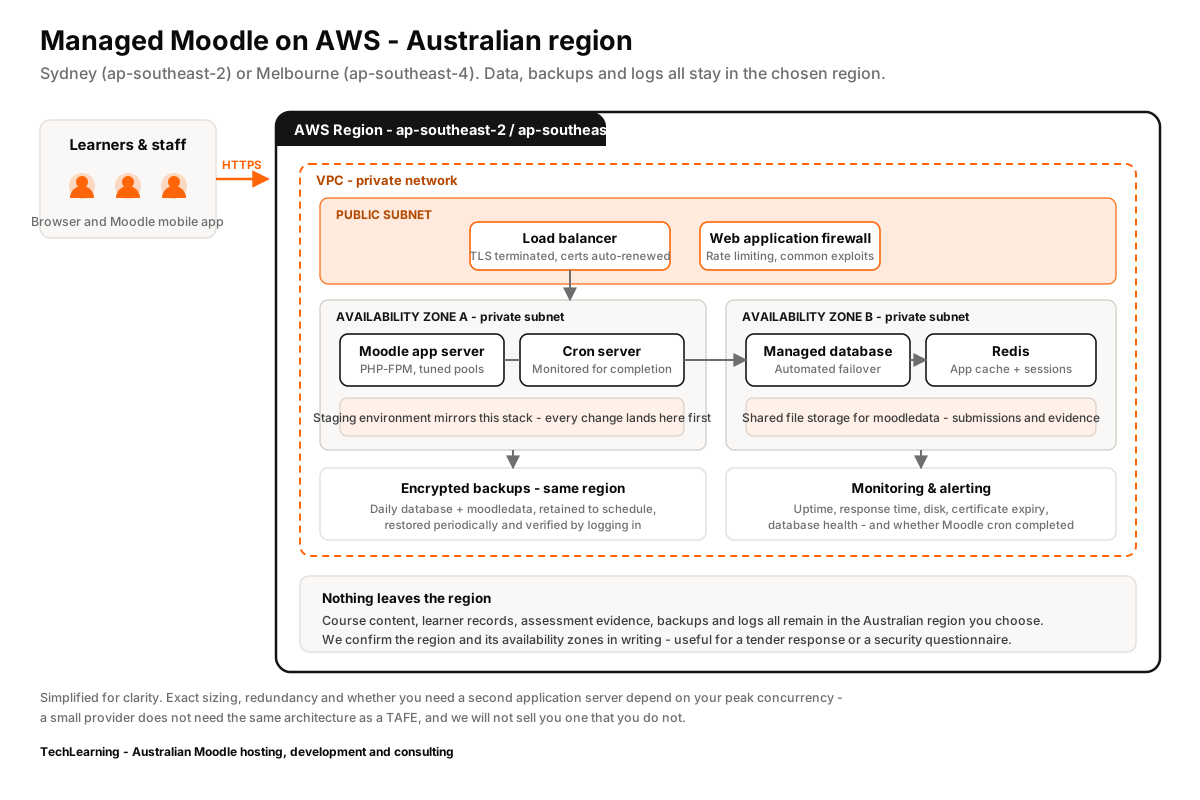
- Redis – Stores session and application data in memory.
Redis Documentation - OPcache – Caches PHP code to avoid recompilation.
PHP OPcache manual - CDN (Content Delivery Network) – Use Cloudflare CDN or Bunny.net to deliver static files faster.
Enable Redis in your config.php file and set Moodle’s cache store accordingly. This reduces database load and boosts overall site responsiveness.
3. Optimize the Database Layer
Your database is the heart of Moodle. A poorly tuned one can slow down even the best server.
Best practices:
- Use InnoDB for all tables.
- Adjust
innodb_buffer_pool_sizeto 70% of RAM. - Enable slow query logging to identify heavy queries.
- Schedule table optimization weekly.
If your site grows beyond 1000 users, consider separating the database from the web server to balance load.
See MySQL Performance Tuning Tips.
4. Configure Cron Jobs Properly
Moodle uses cron to process background tasks – sending emails, cleaning logs, updating reports.
Set a system cron job every minute:
*/1 * * * * /usr/bin/php /var/www/html/admin/cli/cron.php >/dev/null 2>&1
Check the official Moodle Cron documentation for additional options and scheduling frequency.
5. Store and Back Up Data Efficiently
Use fast local SSD storage for your moodledata folder, but keep backups off-site for safety.
Recommended approach:
- Sync files to Amazon S3 nightly.
- Automate database dumps with
mysqldump. - Maintain at least three rolling backups.
For large sites, consider object storage integration or S3-compatible services like Wasabi.
6. Secure Your Moodle Hosting
Security and performance go hand-in-hand. Protect your LMS from spam and malware to keep it running smoothly.
Checklist:
- Install an SSL certificate (Let’s Encrypt).
- Restrict SSH access and enable a firewall (UFW or CSF).
- Keep Moodle and plugins up to date.
- Review Moodle security guidelines.
7. Monitor and Benchmark Regularly
Continuous monitoring ensures consistent performance.
Recommended tools:
- GTmetrix – front-end load testing.
- UptimeRobot – downtime alerts.
- New Relic – deep server metrics.
Review your performance reports monthly and adjust server configurations accordingly.
Ready to boost your Moodle hosting performance? Book a free consultation today to host your Moodle LMS with expert support, high uptime, and secure, scalable infrastructure.
📞 Contact Us
📧 support@techlearning.com.au
🌐 www.techlearning.com.au/contact
The order that actually matters
Performance advice tends to arrive as a long undifferentiated list. In practice three things account for most of the improvement on a typical Moodle site, and the rest is refinement:
- Caching, configured properly. Redis for both application cache and sessions. Session writes hitting the database during a quiz start is one of the most common causes of a site falling over under load.
- A database tuned for Moodle’s query pattern. Buffer pool sized to hold the working set, and slow query logging switched on so you are measuring rather than guessing.
- Cron completing reliably. Not merely scheduled – completing. A stalled cron degrades the site gradually and silently, and the symptoms look like everything except cron.
What to measure, and when
Measure during real teaching load, not at 6am when the site is idle. The useful figures are time to first byte on a logged-in course page, database time as a share of total request time, and PHP-FPM queue depth at peak. If requests are queuing for a worker, adding CPU will not help until the pool sizing is right.
Uncached page generation is the number that reveals the truth. A site that looks fast because of full-page caching can still be slow for every logged-in user, and logged-in users are the only ones who matter here.
Things that look like optimisation but are not
- Full-page caching for authenticated users. Moodle pages are per-user. Aggressive page caching either does nothing for learners or shows one learner another’s content, which is far worse than slow.
- Raising PHP memory limits to hide a problem. It postpones the failure and makes the eventual one harder to diagnose.
- More application servers before fixing the database. If the database is the bottleneck, more servers make the contention worse.
Keeping it fast
Performance regresses quietly – a new plugin, a growing question bank, a course with three thousand activities. A periodic review against the same metrics catches drift before it becomes a complaint, which is why it belongs in a maintenance routine rather than a one-off project.
Putting this into practice
Caching, database tuning and PHP-FPM sizing are the three that move the needle furthest, and they need to be set against your real peak concurrency rather than an average. The number that matters is not how many learners you have – it is how many are in the same activity in the same fifteen minutes.
Every item here is included in our managed hosting, and covered by the response targets we publish. If you host elsewhere and just want the tuning done, that is custom work we take on.
Before you switch providers, the 30 questions to ask any Moodle host is worth asking whoever you are considering.